
Working at AEW
Pay & Programme Information
Welcome to the AEW team! This page contains everything you need to know about working at our Holiday Programmes, including how to record your hours, get paid and prepare for your next programme.
Upcoming programme dates, rosters and staff availability.
AEW typically runs four Holiday Programmes each year, during the school holidays.
Our usual programme hours are:
Monday – 9am–1pm
Tuesday – 9am–1pm
Wednesday – 9am–1pm
Thursday – 9am–3pm
Friday – 9am–1pm
We do not operate on public holidays.
Please note that these are the hours children attend the programme. Your working hours may be different to allow for staff briefings, preparation, set-up and pack-down.
Availability and rosters
Before each Holiday Programme, we will contact you to confirm your availability. Programme Leads will then arrange staffing based on the needs of the children attending, staff experience and availability.
As a casual employee, you are not guaranteed work at every programme. However, once you have accepted a shift, we rely on you to attend.
If your availability changes after you have accepted a shift, please let your Programme Lead know as soon as possible.
Upcoming programme dates
You can find our upcoming Holiday Programme dates on the AEW website. https://www.autismexperiences.org.nz/holiday-program/holiday-programme-info
AEW staff are employed directly by Autism Experiences Wellington Trust. We use Xero to manage our payroll and Xero Me for employee timesheets and payslips.
Your pay rate
Your individual pay rate is set out in your employment agreement or otherwise agreed with AEW in writing.
When will I get paid?
Payroll arrangements and timesheet submission deadlines will be communicated before each Holiday Programme.
Please make sure your timesheet is accurate and submitted on time so we can process your pay.
Holiday pay
Under AEW’s current casual employment arrangements, eligible employees receive 8% holiday pay in addition to their ordinary wages. This is shown separately on your payslip.
Tax (PAYE)
As an employee, income tax and applicable ACC earners’ levies are deducted from your wages before you are paid.
You are responsible for providing AEW with the correct tax code by completing an IR330 form and letting us know if your tax code changes.
https://www.ird.govt.nz/income-tax/income-tax-for-individuals
KiwiSaver
KiwiSaver is New Zealand’s retirement savings scheme. Whether you are automatically enrolled, can choose to join, or need to make contributions depends on your individual circumstances and eligibility.
Please ensure you have completed the relevant KiwiSaver paperwork as part of your onboarding. https://www.ird.govt.nz/kiwisaver
Payslips
You can view and download your payslips through Xero Me. Your payslip shows your earnings, holiday pay, deductions and the amount paid into your bank account.
If something doesn’t look right, please get in touch with the AEW administration team so we can look into it.
About Xero Me
AEW uses Xero Me to manage employee timesheets and payroll. Xero Me is a self‑service app for employees. It lets you quickly check your payslips and submit timesheets, all in one place. Using Xero Me means you can access what you need, when you need it.
You can use Xero Me to:
- Record and submit your hours worked.
- View and download your payslips.
- View and request leave, where applicable.
- View and update your personal details.
You can access Xero Me using the free mobile app or through your web browser. Setup information is below, or, for a visual walkthrough of how to get started check out the learning video from Xero at: https://learning.central.xero.com/student/page/4921-xero-me
Step 1: Accept your invitation
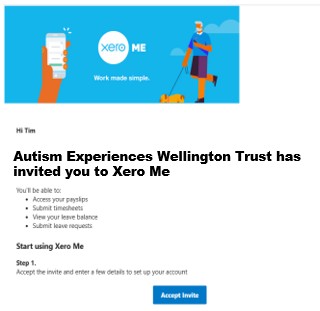
You will receive an email invitation from AEW to join Xero Me.
- Open the invitation email.
- Select Accept Invite.
- Follow the prompts to create your Xero account.
If you haven’t received your invitation, please check your junk or spam folder before contacting the AEW administration team.
Step 2: Download the Xero Me app
Download the free Xero Me app onto your phone.
- iPhone: Search for Xero Me in the Apple App Store.
- Android: Search for Xero Me in the Google Play Store.
Make sure you download Xero Me, rather than the standard Xero accounting app.
Step 3: Set up your login
Once you have downloaded the app:
- Log in using the email address and password you set up when accepting your invitation.
- Follow the prompts to set up multi-factor authentication (MFA). This helps keep your personal and payroll information secure.
- Follow any additional prompts to set up your app security and notification preferences.
Step 4: Set up your timesheet preferences
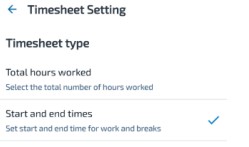
Before entering your first timesheet, make sure your settings allow you to record your start and finish times.
- Open Xero Me.
- Go to Timesheets.
- Select the Settings icon.
- Select Start and end times.
You should only need to do this once.
Step 5: Record your hours worked
We recommend entering your hours at the end of each working day while they are fresh in your mind.
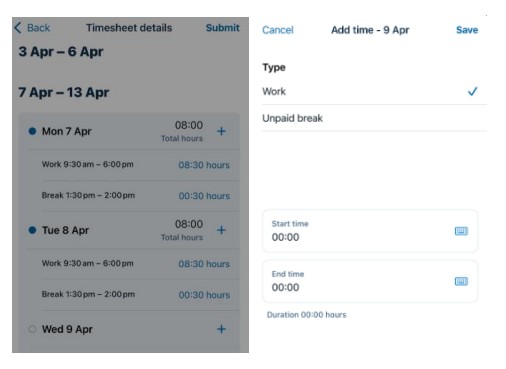
- Go to the Timesheets tab.
- Select + Add Timesheet.
- Select the relevant pay period.
- Select the day you worked.
- Enter your actual start and finish times.
- Record any unpaid breaks, where applicable.
- Add any relevant notes.
- Save your entry.
What hours should I record?
Your timesheet must accurately reflect the hours you have worked.
- Record your actual start and finish times.
- Include any additional time worked as agreed with your Programme Lead.
- Record any required training, meetings or other work undertaken for AEW.
- Do not deduct paid rest breaks from your hours.
- Record unpaid meal breaks where applicable.
- Do not enter hours for days you have not worked.
If you are unsure what hours to record, please speak to your Programme Lead.
Using the notes section
Use the notes section to provide additional information where needed.
For example:
- Programme set-up or pack-down.
- Staff induction or training.
- Staff meeting.
- Additional hours agreed with your Programme Lead.
- Acting Programme Lead duties.
Step 6: Submit your timesheet
At the end of the relevant pay period:
- Check that all your working days and hours have been entered correctly.
- Check that any unpaid breaks have been recorded.
- Make sure any additional information has been included in the notes section.
- Select Submit to send your timesheet for approval.
Please ensure your timesheet is submitted by the deadline communicated by AEW so that your pay can be processed on time.
If you realise you have made a mistake after submitting your timesheet, please let your Programme Lead or the AEW administration team know as soon as possible.
Step 7: Leave and absences
Most AEW employees work on a casual basis, with holiday pay paid alongside their regular wages.
Other leave entitlements may apply depending on your employment circumstances and eligibility.
If you are unable to attend an agreed shift, please contact your Programme Lead as soon as possible. Do not rely on submitting a leave request through Xero Me to notify AEW of your absence.
If you believe you are entitled to paid leave, please speak to the AEW administration team for guidance on how to record this.
Step 8: View your payslips and personal details
Payslips
You can view and download your current and previous payslips through Xero Me.
Timesheets
You can view your current and previously submitted timesheets.
My details
You can view your personal information. Please let the AEW administration team know if any of your details change, particularly your bank account or tax information.
Need help?
If you have any questions about setting up Xero Me, recording your hours or accessing your payslips, please get in touch.
- Hours worked and timesheet queries: Your Programme Lead.
- Xero Me access, payroll and personal details: AEW administration team.
We’re happy to help, particularly if this is your first time using Xero Me.
All AEW employees are required to record and submit their hours using Xero Me.
We recommend recording your hours at the end of each working day rather than waiting until the end of the programme.
Recording your hours
Your timesheet should accurately reflect the hours you have actually worked, including:
- Your start and finish times.
- Required staff briefings.
- Programme set-up and pack-down.
- Required staff meetings, induction and training.
- Any additional duties or hours worked.
Record unpaid meal breaks where applicable. Paid rest breaks should not be deducted from your hours.
If you need to work outside your agreed hours or undertake additional duties, please discuss this with your Programme Lead. All time actually worked must still be accurately recorded.
How to enter your timesheet
- Open the Xero Me app.
- Select Timesheets.
- Select + Add Timesheet and choose the relevant pay period.
- Select the day you worked.
- Enter your actual start and finish times.
- Record any unpaid breaks, where applicable.
- Add any relevant notes and save your entry.
Using the notes section
Please include additional information where it will help your Programme Lead understand and approve your hours.
Examples include:
- Staff induction or training.
- Programme preparation.
- Late collection of a child.
- Acting Programme Lead duties.
- Additional hours worked.
Submitting your timesheet
Before submitting your timesheet:
- Check that all your working days have been entered.
- Check your start and finish times.
- Check that any unpaid breaks have been recorded.
- Include any relevant notes.
Select Submit to send your timesheet for approval.
Please ensure you submit your timesheet by the deadline communicated for each Holiday Programme.
If you make a mistake after submitting your timesheet, please contact your Programme Lead or the AEW administration team as soon as possible.
Rest and meal breaks
Taking breaks is important for your wellbeing and helps ensure you can provide the best possible support to our children and young people.
Your entitlement to breaks depends on the length of your working day.
| Hours worked | Break entitlement |
|---|---|
| 2–4 hours | One paid 10-minute rest break |
| More than 4 and up to 6 hours | One paid 10-minute rest break and one unpaid 30-minute meal break |
| More than 6 and up to 8 hours | Two paid 10-minute rest breaks and one unpaid 30-minute meal break |
Your Programme Lead will coordinate breaks to ensure appropriate supervision and staffing levels are maintained throughout the day.
Please make sure another staff member has taken over responsibility for any children you are supporting before taking your break.
If you are unwell or unable to work
If you are unable to attend an agreed shift, please contact your Programme Lead as soon as possible.
Please do not attend the programme if you are unwell with an illness that could be passed on to others.
We rely on appropriate staffing levels to operate our programmes safely, so giving us as much notice as possible is really helpful.
Leave entitlements
As a casual employee, your eligibility for sick leave, bereavement leave and other types of leave will depend on your individual employment circumstances and the relevant legislation.
If you have any questions about your leave entitlements, please contact the AEW administration team.
Public holidays
AEW does not normally operate Holiday Programmes on public holidays. Any applicable public holiday entitlements will be assessed in accordance with employment legislation.ossible.
We want all our staff to feel confident, supported and prepared when working at an AEW Holiday Programme.
Before your first programme
Before you begin working with us, you will need to complete the relevant onboarding requirements, including:
- Completing and signing your employment agreement.
- Providing your payroll, tax and KiwiSaver information, where applicable.
- Completing the required Children’s Worker Safety Check.
- Reading the AEW Code of Conduct and relevant policies.
- Setting up your Xero Me account.
- Completing any required induction and training.
Before each programme
Your Programme Lead will provide information about the upcoming programme, including your roster, programme arrangements, activities and any relevant staff briefings.
Please make sure you have read the information provided and raise any questions before the programme begins.
What to bring
We recommend bringing:
- Comfortable clothing suitable for active work.
- Comfortable, practical footwear.
- A named water bottle.
- Your own lunch and snacks.
- A sunhat and sunscreen during warmer months.
- Suitable clothing for outdoor activities and changes in weather.
During the programme
Please arrive ready to work at your agreed start time, participate in staff briefings and follow the guidance of your Programme Lead.
Our programmes are all about creating a safe, welcoming and enjoyable environment for autistic children and young people.
Every child is different, and we encourage our staff to be flexible, patient, respectful and responsive to individual needs.
You are part of a team. If you are unsure about something, need support or have a concern, please ask. We don’t expect you to have all the answers!
Please help us keep your employment records up to date by letting the AEW administration team know if any of your personal information changes.
This includes:
- Your name or address.
- Your phone number or email address.
- Your emergency contact details.
- Your bank account details.
- Your tax code.
- Your KiwiSaver arrangements.
- Your eligibility or right to work in New Zealand, where applicable.
Please also let us know if there are any changes to your circumstances that may affect your ability or suitability to work safely with children and young people.
Some personal information can be viewed through Xero Me. However, please contact the AEW administration team directly if you need to update your payroll or employment records.
To protect your privacy, please do not share sensitive personal information, bank account details or tax information through staff group chats.
Need a Hand?
We’re a small team, and we’re here to help. If you have a question or concern, please get in touch.
Your Programme Lead
Contact Pete (Juniors) or Stephen (Seniors) for Day-to-day programme support, including rosters, availability, absences, working hours, activities, supporting children and timesheet queries.
Programme Administration
Contact Sharon, our Programme Admin – secretary@autismexperiences.org.nz for Employment administration, including onboarding, employment paperwork, staff records, personal information and general administration.
Payroll & Payments
Contact Julie, our Treasurer – treasurer@autismexperiences.org.nz for Pay, payslips, Xero Me, tax, KiwiSaver and payroll queries.